Rules of a flow: re-entry, exit, goal and control group
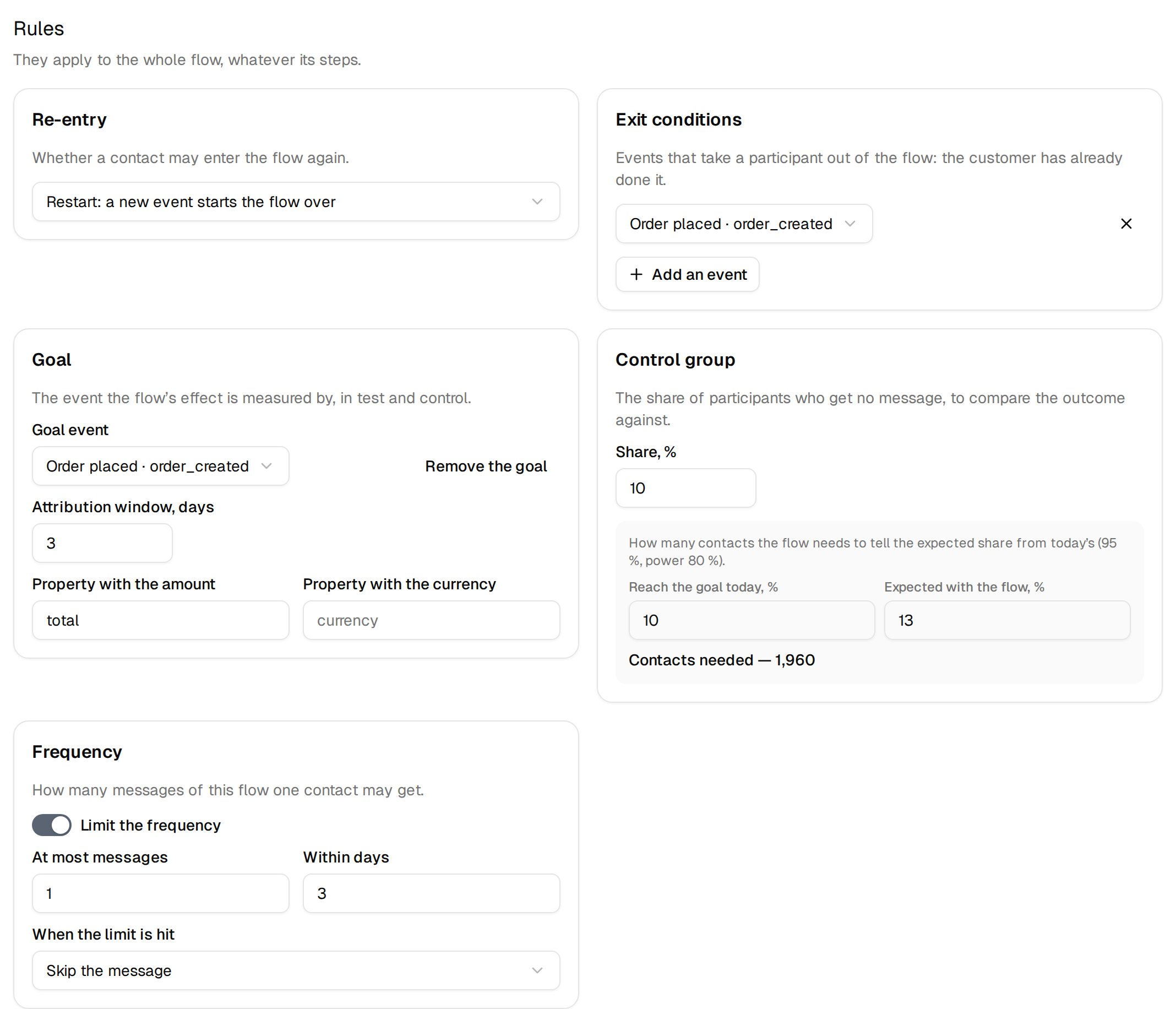
Screen: the flow editor, address /flows/<number of the flow>?tab=rules, the Rules tab. The rules apply to
the whole flow, whatever its steps, and like the steps they change in the draft: they start working after the
flow is published.
Re-entry
Whether a contact can enter the flow again.
| Option | What happens |
|---|---|
| Once | A contact enters the flow once in its life; later events of the same contact are ignored |
| After finishing | Again — but only after the previous pass is over |
| Not more often than once in N days | Again, if at least Days between entries have passed since the last entry |
| Restart: a new event starts the flow over | A new event cancels the current pass and starts the flow from the beginning |
Restart is for flows that react to the latest state: an abandoned cart is a good example — each change of the cart starts the wait anew, and the reminder goes after the last one.
Exit conditions
Events after which a participant leaves the flow: the customer has already done what the flow asks for. An unpaid-order reminder leaves on the payment; an appointment reminder leaves on the cancellation. Messages that have not gone yet are not sent.
Goal
The event by which the result of the flow is measured — for example, a paid order after a cart reminder.
- Goal event — which event counts.
- Attribution window, days — how long after entering the flow a goal still counts.
- Property with the amount and Property with the currency — if the goal event carries an amount, the report adds it up: how much money the flow brought.
A participant who reaches the goal leaves the flow. A flow without a goal of its own takes the default result from the settings when it is published. With neither, the flow works, but its report shows only how much was sent, not whether it helped — the publication warns about it.
Control group
Share, % — the part of the participants who get no message at all. They go through the flow as everyone else, but the messages are only marked as "would have been sent". The report then compares the two groups: the difference between them is the real effect of the flow, and not the customers who would have paid anyway.
The hint under the share counts how many contacts the flow needs for a reliable answer: enter the share that Reach the goal today, % and the share Expected with the flow, %, and the cabinet shows Contacts needed (a 95 % confidence and an 80 % power). The smaller the expected difference, the more contacts it takes.
A control group without a goal measures nothing — the publication warns about it.
Frequency
How many messages of this flow one contact may get: At most messages in Within days. When the limit is hit, the message is either skipped (Skip the message) or waits until the contact may get one again (Hold until the next window).
This limit is the flow's own. On top of it there is a common limit of marketing messages for all flows — in the flows settings.