The «Send» step: channel, text and variables
Screen: the flow editor, address /flows/<number of the flow>, the Send step. Select the step on the
diagram or in the list, and its settings open next to it — Building a flow in the editor.
Channel
| Channel | How it goes |
|---|---|
| SMS | An SMS to any phone |
| Viber | A Viber message only |
| Viber, then SMS | Viber first; if it is not delivered, the same person gets an SMS |
| RCS, then SMS | An RCS card for those whose operator supports RCS, an SMS for the rest |
| RCS | RCS only — those without RCS get nothing, and the publication warns about it |
| A message by an approved WhatsApp template |
A cascade has a separate field for the SMS text — SMS text if Viber is not delivered (or RCS): an SMS is shorter and has no buttons, so its text is usually written apart.
If the account cannot use the chosen channel yet, the reason is written under the field: no approved sender name for the channel (with a link to Sender names), WhatsApp not connected, no approved WhatsApp templates, or e-mail not enabled for the account. Such a flow can be saved, but messages by that channel will not go out.
Message type
The type decides who may receive the message and when.
| Type | What it is for | Who gets it |
|---|---|---|
| Service | An invoice, an order, access | Everyone: marketing consent is not needed |
| Reminder | Tips and reminders | Everyone except those who unsubscribed from reminders |
| Marketing | Offers and promotions | Only those who consented to marketing on this channel, and within the frequency limit |
Every type waits out the quiet hours: a message that falls on the night goes in the morning, by the recipient's time zone. Urgent: goes at once, even during quiet hours — a tick that only the Service type has, for what cannot wait: a sign-in code, a failed payment.
Sender name
The Sender name field holds one name per channel of the step, and only names approved for your account can be picked — the same ones as in your campaigns. From the settings takes the default name from the flows settings.
- If the account has a single approved name for the channel, it is taken by itself.
- If there are several and neither the step nor the settings name one, the publication asks you to pick it.
- A name that is no longer approved is marked in the step, and the changes of the step are not saved until you pick another.
How to get a name approved — Sender names.
Text and its variants
Message text is the text the contact receives. A step may hold several variants of it:
- Main — the text for most cases;
- Variant 2, Variant 3… — texts for special cases, each with its own condition under When to use this variant;
- Fallback — the last variant: it is sent when the event lacks the variables the other ones need.
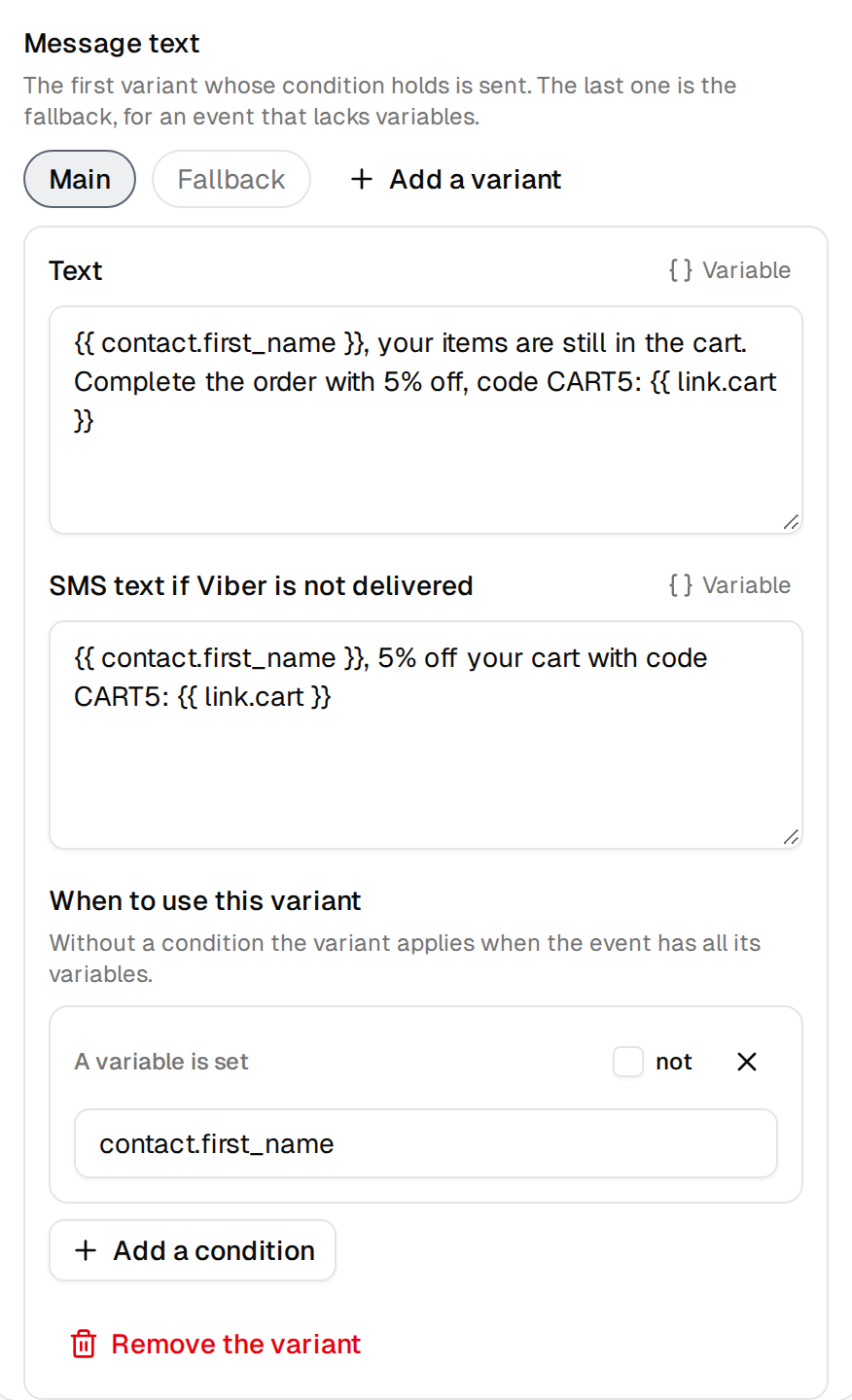
The first variant whose condition holds is sent. A variant without a condition applies when the event has all of its variables. If no variant fits and there is no fallback, the message is not sent, and the report names the reason "No variable and no fallback text".
Variables
Variable next to a field inserts a value from the data of the flow:
| Group | What is in it | Example |
|---|---|---|
| Event | The properties of the start event | {{ trigger.order_id }} |
| Contact | The contact's fields | {{ contact.first_name }} |
| AlphaFlow | The data of the flow itself | {{ run.flow_key }} |
| Step links | The step's links, for SMS and Viber | {{ link.cart }} |
A variable can carry a filter: {{ trigger.total | money }} writes an amount, {{ trigger.visit_at | date:"d.m.Y" }}
— a date in the given form, {{ contact.first_name | default:"customer" }} — a value for when the field is
empty.
A variable the flow does not know is underlined and listed under Unknown variables — usually a typo, or a property that has never come in an event. Event properties appear in the list after the first event of this type has arrived; their titles come from the event types.
Links
Links are named addresses of the step: a name and an address that starts with https://. In an SMS or a
Viber text a link is inserted as a variable — {{ link.cart }}. Every address gets UTM tags: the link's name
goes into the tag, and utm_source and utm_medium come from the settings.
RCS and WhatsApp
RCS adds to the text a Picture (an https:// address) and a Button — up to 30 characters, leading
to one of the step's links or to an address of its own.
WhatsApp has no free text: the message is an approved WhatsApp template, and the step fills in its values — the numbered substitutions, and, depending on the template, the file or the place in the header, the value of a link button or a coupon code. A marketing message goes only by a template of the Marketing category, a service one — only by a Utility template.
Preview
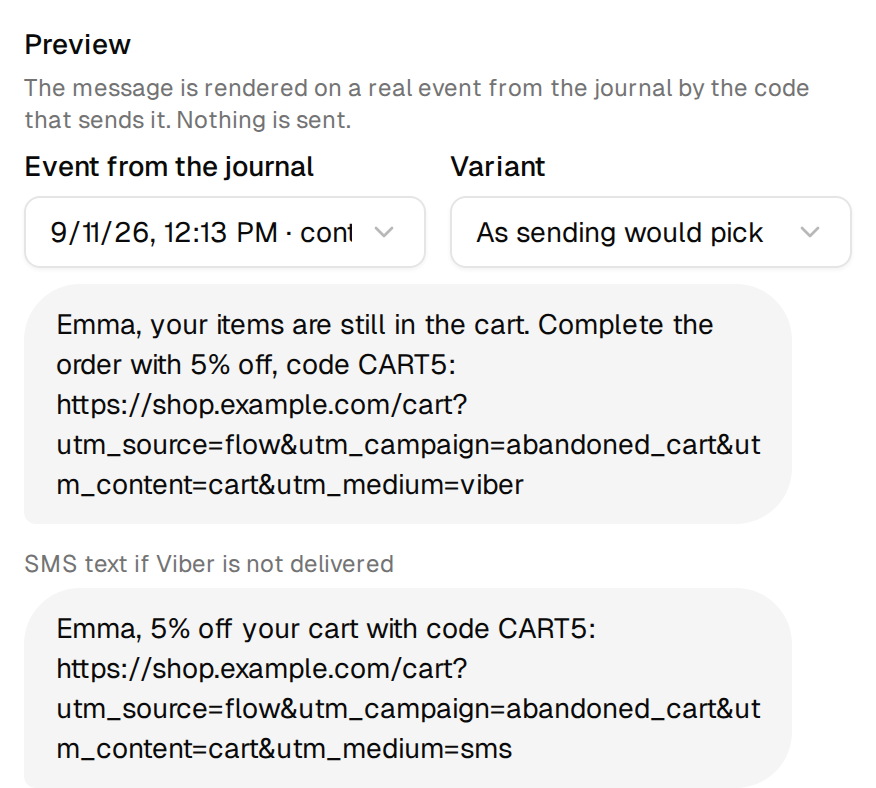
Preview builds the message on a real event from the journal, by the same code that sends it: with the variables filled in, the variant that sending would pick and the final link addresses with UTM tags. Nothing is sent.
- Event from the journal — which event to build on; Variant — "As sending would pick" or a specific one.
- If the variant lacks variables on this event, the preview names them.
- While no start event has arrived, there is nothing to build on — the preview leads to the event journal.