The flow report: funnel, control group and why messages were skipped
Screen: AlphaFlow report, address /flows/<number of the flow>/report. It opens with the Report link in the
list of flows and the Report button in the editor.
The report has two tabs: Report — the totals, and Journal — a line per participant. Test runs are not counted anywhere in it.
Period and version
- Period — by the time a participant entered the flow; All time by default. The days are counted in the time zone from the flows settings.
- Version — the figures of one published version or of all of them. The Steps table always belongs to one version: the steps of different versions differ.
The filters live in the address of the page, so a link to the report opens it with the same period and version.
Funnel
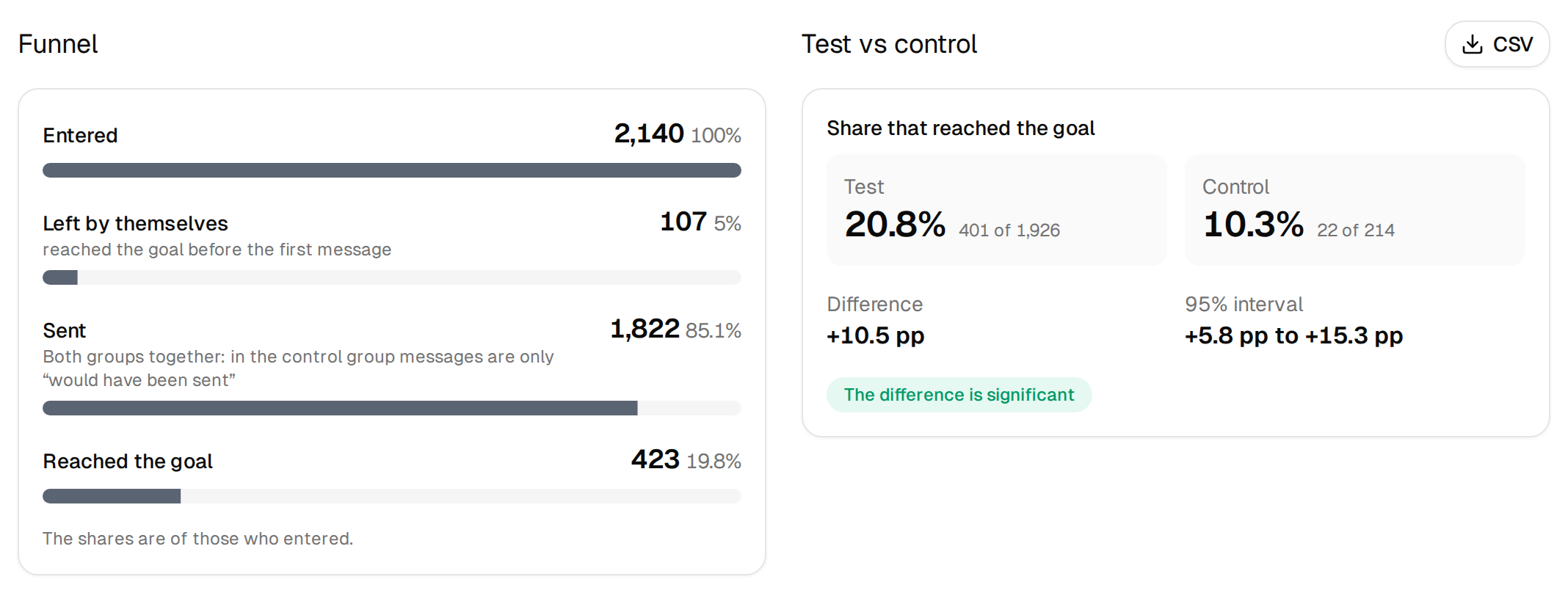
Entered → Left by themselves → Sent → reached the goal. The shares are counted of those who entered.
- Left by themselves — reached the goal before the first message: they would have done it anyway, and the flow should not be credited for them.
- Sent — both groups together; in the control group a message is only "would have been sent".
Test against control
If the flow has a control group, the report compares the share that reached the goal in the test group and in the control group.
| Line | What it says |
|---|---|
| Difference | The difference of the shares, in percentage points |
| 95 % interval | Where the true difference lies with 95 % confidence |
| The difference is significant | The interval does not cross zero: the flow works |
| The difference is not significant | It cannot be told from chance yet |
| Not enough data | Too few participants for any conclusion; next to it — Contacts still needed for a conclusion |
Groups in numbers breaks both groups down: entered, in progress, finished — reached the end, left on an event or the goal, cancelled, failed — sent and the goal. In the control group "sent" means "would have been sent": no real message goes out there.
Steps
A line per step of the version: Passed, Skipped, Exited, Errors, Held and On the step now. A condition shows how many went by yes and by no; waiting for an event — how many got the event came and how many timed out. The numbers are participants, not attempts: a step held three times counts once.
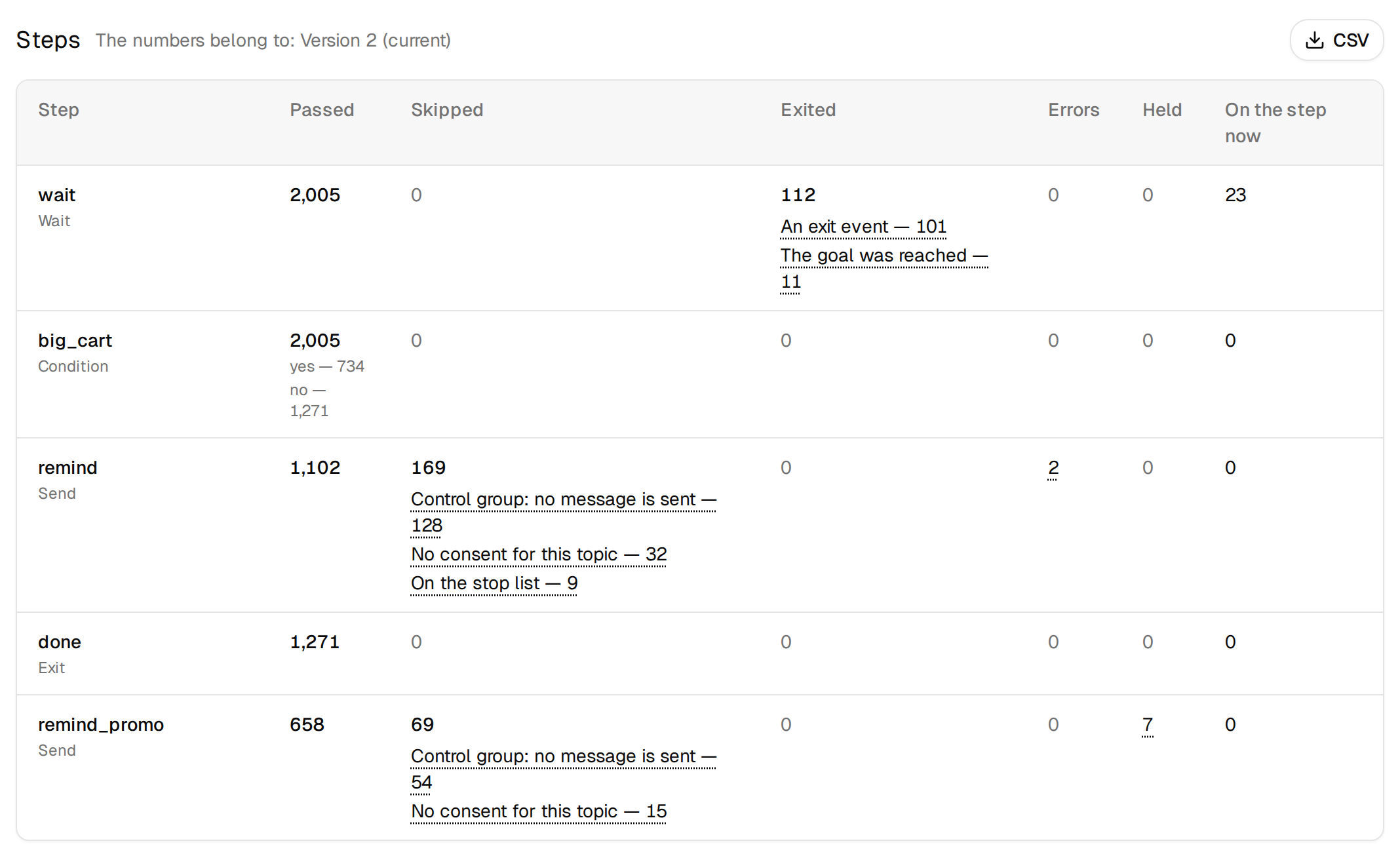
Every number of skipped, exited, held or failed opens the contacts behind it, with the reason for each — a way from "12 skipped" to the actual people and to their timeline.
Why a message was skipped
| Reason | What it means | What to do |
|---|---|---|
| On the stop list | The contact unsubscribed, complained, answered STOP, or the channel was closed by hand | Nothing: this is the contact's choice — see the stop list |
| No consent for this topic | A marketing message, and the contact has not agreed to offers on this channel | Collect the consent — Consent to marketing |
| No phone or email for this channel | The contact has no address the channel could use | Send the phone in the events |
| Quiet hours: will be sent at… | Not a refusal: the message waits for the end of the quiet hours | — |
| The frequency cap is exceeded | The contact already got the allowed number of messages | Check the frequency limits |
| Control group: no message is sent | The contact is in the control group | — |
| A variable is missing and there is no fallback text | The event lacks a variable the text needs | Add a fallback variant — Text and its variants |
| The customer has already done it | An exit event came before the message | — |
| Channel error | The channel refused the message; the code is next to it | Look at the code in the contact's timeline |
| A test or internal contact | Test contacts are skipped by working flows | — |
| The account is blocked or deleted | Sending from the account is not possible | Contact support |
| The flow was stopped | The message was queued when the flow was stopped | — |
| Flows are switched off | The section was switched off when the message was due | Switching the section off |
A participant can also leave the flow at a pause: The event had no date to wait for — the start event had no date for the "until a date of the event" pause; The moment had passed — nothing was sent — the date was already in the past, and the step was set not to send late.
Messages and cost
A line per channel: Total, Pending, Delivered, Clicked, Failed, Skipped and Cost. A cascade such as "Viber, then SMS" is also broken down by the channel the messages actually went by. The cost of SMS and Viber appears a few minutes after delivery.
Goal amount adds up the amounts of the goal events by group and currency — if the goal has a property with the amount (Goal). Goals without an amount are counted separately.
Journal
The Journal tab is a line per participant, the newest first: who entered, the start event and its properties, when the participant entered, the outcome and the goal. Group narrows it to the test or the control group.
| Outcome | What it means |
|---|---|
| Sent | The message went out |
| Control: nothing sent | The participant is in the control group |
| Cancelled: the customer acted | An exit event came |
| Cancelled: restarted | A new event started the flow over — Re-entry |
| Cancelled: the flow was stopped | The flow was stopped while the participant was in it |
| Skipped | The message was skipped; the reason is next to it |
| Failed | The channel refused; the code is next to it |
| In progress / Waiting to be sent | The participant is still in the flow |
| Finished without a message | The flow ended without a single send for this participant |
CSV export
The CSV buttons export the groups, the test-against-control result, the steps, the messages, the goal amounts and the journal — each as its own file, with the same period and version as on the screen. The journal goes out for the whole period, not one page; the time in the file is in the flows' time zone, and the properties of the start event become columns.